GATE Scientific Calculator Functions - All 60+ Buttons Explained
By Meet Dhanani · Published: 19 July 2026 · Updated: 15 September 2026
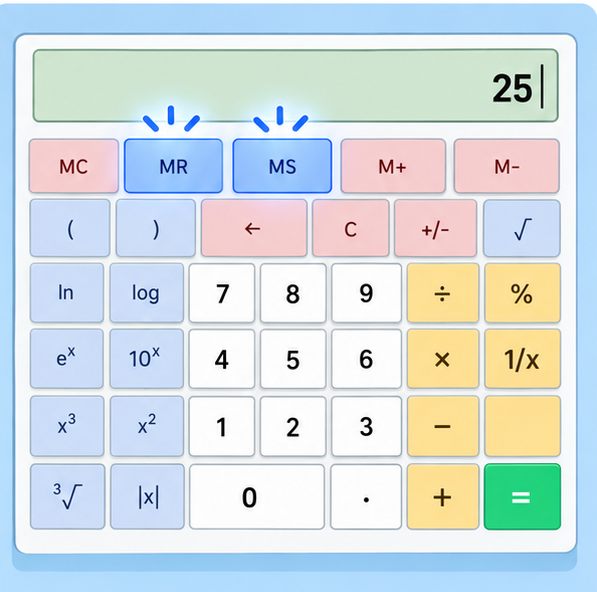
The GATE virtual calculator has over 60 buttons covering everything from basic arithmetic to hyperbolic functions. Here is a complete reference for every scientific function, organized by category with exact button sequences.
Remember: the calculator uses post-fix input. Enter the value first, then press the function button.
Trigonometric Functions (6 Buttons)
Buttons: sin, cos, tan, sin^-1, cos^-1, tan^-1
| Operation | Button Sequence | Result (Deg mode) |
|---|---|---|
| sin(30) | 30 -> sin | 0.5 |
| cos(60) | 60 -> cos | 0.5 |
| tan(45) | 45 -> tan | 1 |
| sin^-1(0.5) | 0.5 -> sin^-1 | 30 |
| cos^-1(0) | 0 -> cos^-1 | 90 |
| tan^-1(1) | 1 -> tan^-1 | 45 |
Always verify the Deg/Rad indicator before any trig calculation. sin(30) in Degree mode is 0.5. sin(30) in Radian mode is -0.988. Wrong mode = wrong answer with no error message to warn you.
Hyperbolic Functions (6 Buttons)
Buttons: sinh, cosh, tanh, sinh^-1, cosh^-1, tanh^-1
These appear in engineering mathematics problems involving differential equations, Laplace transforms, and signal processing. Same post-fix input: type 1, click sinh = 1.1752.
The angle mode toggle (Deg/Rad) does not affect hyperbolic functions. They always operate on the raw numerical value.
Logarithmic Functions (4 Buttons)
Buttons: log (base 10), ln (natural log/base e), log2x (base 2), logyx (arbitrary base)
| Operation | Button Sequence | Result |
|---|---|---|
| log(1000) | 1000 -> log | 3 |
| ln(e) | e -> ln | 1 |
| log2(256) | 256 -> log2x | 8 |
| log base 3 of 81 | 81 -> logyx -> 3 -> = | 4 |
logyx is a binary operation (requires two inputs). Enter the number first, click logyx, then enter the base, then click =. This is useful for problems where the base is not 10, e, or 2.
Exponential Functions (3 Buttons)
Buttons: e^x, 10^x, Exp
e^x and 10^x are unary (post-fix): type 2, click e^x = 7.389. Type 3, click 10^x = 1000.
Exp is for entering numbers in scientific notation. To enter 3 x 10^5: type 3, click Exp, type 5 = 300000. This is faster than typing 300000 or calculating 3 x 10^5 manually.
Powers and Roots (6 Buttons)
Buttons: x^2, x^3, x^y (arbitrary power), sqrt, cube root, y-root-x (nth root)
| Operation | Button Sequence | Result |
|---|---|---|
| 5 squared | 5 -> x^2 | 25 |
| 4 cubed | 4 -> x^3 | 64 |
| 2^10 | 2 -> x^y -> 10 -> = | 1024 |
| sqrt(144) | 144 -> sqrt | 12 |
| cube root of 27 | 27 -> cube root | 3 |
| 4th root of 625 | 625 -> y-root-x -> 4 -> = | 5 |
Special Functions (3 Buttons)
n! (Factorial): Type 5, click n! = 120. Works for integers up to about 170 before overflowing. Precision is limited to 14 significant digits.
|x| (Absolute value): Type -7, click |x| = 7. Useful when you need the magnitude without the sign.
1/x (Reciprocal): Type 4, click 1/x = 0.25. Critical for calculating cosec, sec, and cot since those buttons do not exist on the calculator.
Memory Functions (5 Buttons)
| Button | What It Does |
|---|---|
| MS (Memory Store) | Stores the current displayed value in memory |
| MR (Memory Recall) | Recalls the stored value to the display |
| MC (Memory Clear) | Clears the memory (removes the stored value) |
| M+ (Memory Add) | Adds the current displayed value to what is already in memory |
| M- (Memory Subtract) | Subtracts the current displayed value from memory |
When memory holds a value, an "M" indicator appears in the display. Always press MC at the start of each new question to avoid ghost values from previous calculations.
Functions NOT on the Calculator
The GATE calculator cannot do: matrix operations, quadratic/cubic equation solving, simultaneous equations, complex number arithmetic, polar-rectangular conversions, combinations (nCr), or permutations (nPr). For these, you need to work them out manually on the scribble pad.
Also missing: cosec, sec, and cot buttons. Use the reciprocal workaround instead. For cosec(30): type 30, click sin (gives 0.5), then click 1/x (gives 2). For sec(60): type 60, click cos (gives 0.5), then click 1/x (gives 2). For cot(45): type 45, click tan (gives 1), then click 1/x (gives 1). This two-step approach works for any angle and is fast once you build the habit.
The calculator also lacks a percentage button. To calculate 15% of 800: type 15, divide by 100, multiply by 800. Or type 800, multiply by 0.15 directly. The second approach saves one step.
Practice all these functions on our free online calculator. New to the virtual calculator? Start with our step-by-step guide on post-fix input and common mistakes.