How to Calculate Antilog on the GATE Calculator (10^x Button)
By Meet Dhanani · Published: 24 July 2026 · Updated: 15 September 2026
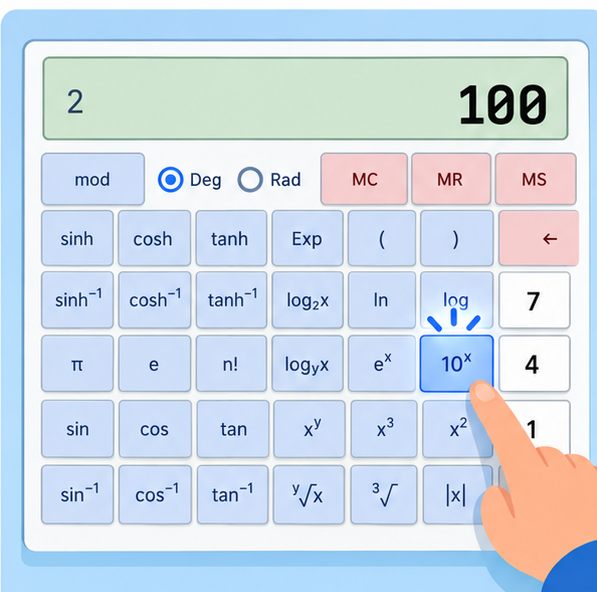
Antilog is the reverse of logarithm. If log(100) = 2, then antilog(2) = 100. On the GATE virtual calculator, the antilog button is labeled 10^x. There is no button that says "antilog" directly.
How to Calculate Antilog (Base 10)
Antilog base 10 means 10 raised to the power of your number. The button for this is 10^x.
Steps: Type the number, then click 10^x.
Example: antilog(3) = type 3, click 10^x = 1000.
That is it. Two actions: enter value, press button. The post-fix input style means you always enter the value first.
How to Calculate Natural Antilog (Base e)
The natural antilog reverses the natural logarithm (ln). If ln(x) = y, then e^y = x. The button is e^x.
Steps: Type the number, then click e^x.
Example: natural antilog of 1 = type 1, click e^x = 2.71828 (which is e itself).
How to Calculate Antilog Base 2
There is no dedicated antilog base 2 button. Use the x^y (power) button instead.
Steps: Type 2, click x^y, type your number, click =.
Example: antilog base 2 of 8 = type 2, click x^y, type 8, click = = 256 (which is 2^8).
Practice Problems
| Problem | Button Sequence | Result |
|---|---|---|
| antilog(2) | 2 -> 10^x | 100 |
| antilog(0) | 0 -> 10^x | 1 |
| antilog(0.5) | 0.5 -> 10^x | 3.16228 |
| antilog(-1) | 1 -> +/- -> 10^x | 0.1 |
| antilog(-2) | 2 -> +/- -> 10^x | 0.01 |
| e^2 (natural antilog of 2) | 2 -> e^x | 7.38906 |
| 2^10 (antilog base 2 of 10) | 2 -> x^y -> 10 -> = | 1024 |
Common Mistakes
Confusing 10^x with x^10. The 10^x button raises 10 to the power of your input. If you wanted x^10 instead, use the x^y button: type your number, click x^y, type 10, click =.
Forgetting which log base to reverse. If your problem involves ln (natural log), the antilog uses e^x, not 10^x. If it involves log (base 10), use 10^x. Mixing these up gives completely wrong answers.
Negative antilog confusion. Antilog(-2) is 10^(-2) = 0.01, not -100. To enter a negative number, type the positive value first, then click the +/- button to make it negative, then click 10^x.
Common Antilog Values for Quick Reference
| Input | antilog (10^x) | natural antilog (e^x) |
|---|---|---|
| 0 | 1 | 1 |
| 0.5 | 3.16228 | 1.64872 |
| 1 | 10 | 2.71828 |
| 2 | 100 | 7.38906 |
| 3 | 1000 | 20.0855 |
| -1 | 0.1 | 0.36788 |
| -2 | 0.01 | 0.13534 |
Memorizing antilog(0.5) = 3.162 and antilog(1) = 10 helps you sanity-check calculator results during the exam. If your answer does not match these known values, you probably used the wrong button.
One more useful pattern: to compute any base antilog (e.g., antilog base 5 of 3), use the x^y button. Type 5, click x^y, type 3, click = to get 125. This generalizes to any base and works for both integer and decimal exponents.
Practice these operations on our free calculator tool until the button sequences become automatic. For the full list of all 60+ calculator functions, see our scientific calculator function reference.