GATE Virtual Calculator Download - Practice Online Free Instead
By Meet Dhanani · Published: 17 August 2026 · Updated: 15 September 2026
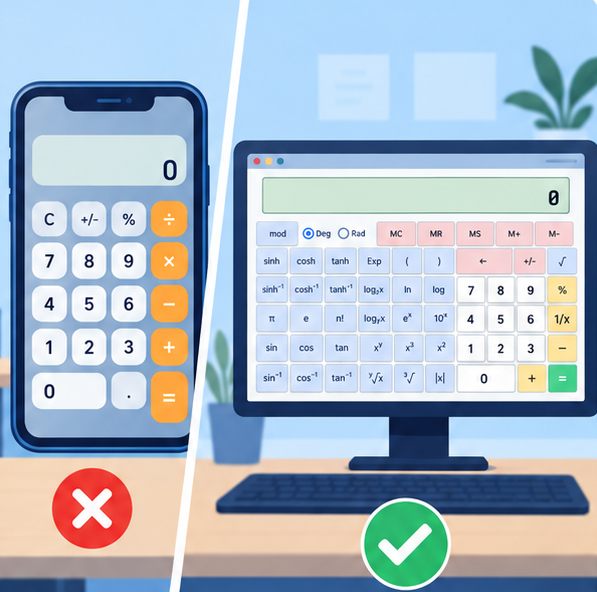
Short answer: you do not need to download anything. The GATE virtual calculator runs entirely in your browser, and our free online version is available right now on any device.
Browser vs Mobile App vs Official TCS iON
There are four ways to practice with a GATE-style calculator. Each has tradeoffs in accuracy, convenience, and how closely it matches the real exam.
| Method | Pros | Cons | Exam Match |
|---|---|---|---|
| gatecalculator.in (browser) | Always available, any device, free, exact replica | Requires internet on first load | Exact |
| Official TCS iON hosted version | Made by the exam provider | Frequently unavailable, no mobile support, slow to load | Exact |
| Play Store / App Store apps | Works offline, native feel | Different layouts, often use infix input, missing functions | Low - varies by app |
| Add-to-homescreen (PWA) | App-like experience, launches from home screen, cached for fast loading | Still browser-based under the hood | Exact |
Why Most Calculator Apps Get It Wrong
The GATE exam uses a very specific calculator interface that most third-party apps fail to replicate accurately. The differences matter more than you might expect.
Input order is the biggest problem. Physical calculators and most apps use infix input where you press the function first, then type the number (press sin, then type 30). The GATE calculator uses the opposite order. Practicing with infix input builds muscle memory that actively works against you on exam day.
Button layout varies widely. The real calculator has a specific arrangement - memory buttons on the left, number pad in the center, scientific functions on the right. Apps rearrange these to fit mobile screens, which means your spatial memory from practice does not transfer to the exam.
Missing or extra functions. Some apps include graphing, equation solving, or matrix operations that the real GATE calculator does not have. Others leave out memory functions (MC, MR, M+, M-) or the Exp button for scientific notation. Both gaps create false expectations.
Visual styling mismatch. The TCS iON calculator has a distinct green equals button, grey function buttons, and a specific display area. When everything looks different on exam day, even students who practiced extensively feel disoriented for the first few minutes.
Add to Home Screen for Quick Access
If you want an app-like experience without the accuracy problems of third-party apps, add our calculator to your home screen. It launches instantly and looks like a native app.
Chrome on Android
- Open gatecalculator.in in Chrome
- Tap the three-dot menu in the top right corner
- Select "Add to Home screen"
- Name it "GATE Calculator" and tap Add
- The calculator now appears as an app icon on your home screen
Safari on iPhone / iPad
- Open gatecalculator.in in Safari
- Tap the Share button (square with upward arrow) at the bottom
- Scroll down and tap "Add to Home Screen"
- Name it "GATE Calculator" and tap Add
- It appears on your home screen with the site icon
Chrome on Desktop (Windows / Mac / Linux)
- Open gatecalculator.in in Chrome
- Click the install icon in the address bar (monitor with a down arrow), or use the three-dot menu and select "Install GATE Calculator"
- Click Install in the dialog
- The calculator opens in its own window and gets a shortcut in your app launcher
Offline Practice Options
Once you have visited our calculator in your browser, the page assets are cached locally. On subsequent visits, the calculator loads even with a weak connection because the interface files are served from your browser's cache.
For truly offline practice with zero connectivity, your options are limited. Third-party mobile apps work offline, but as covered above, they usually differ from the real exam interface. The tradeoff: guaranteed offline access at the cost of practicing on an inaccurate calculator.
Our recommendation: prioritize accuracy over offline convenience. A few days of correct practice on the exact interface beats weeks of practice on the wrong one. If you commute without internet, use that time for theory revision and save calculator practice for when you have connectivity.
Why Downloading Is Unnecessary
The actual GATE exam runs on a computer with a browser-based interface. The virtual calculator is part of that web interface, not a standalone application. Practicing in a browser matches the real exam environment exactly.
Our free GATE calculator replicates the same interface and is accessible from any device with a browser. Unlike the official hosted version, ours is always available when you need it.
What About Mobile Apps?
Several GATE calculator apps exist on Google Play Store and Apple App Store. The problem: mobile app interfaces almost always differ from the actual exam calculator. Button sizes, layouts, and sometimes even the function behavior vary between apps.
You take GATE on a desktop computer, not a phone. Practicing on a phone app builds muscle memory for the wrong interface. A browser-based calculator on your laptop or desktop is the closest match to exam conditions.
That said, our calculator at gatecalculator.in is mobile-responsive with touch-friendly buttons. If you want a quick practice session on your phone during a commute, it works. Just prioritize desktop practice for your main study sessions.
How to Set Up for Practice
- Open our free calculator in Chrome, Firefox, Safari, or Edge on your laptop/desktop
- Bookmark the page for quick access during study sessions
- Use the full-screen mode button for a distraction-free experience
- Disable keyboard input using the toggle (this matches exam conditions where mouse-only input is required)
- Use it for every calculation during your GATE preparation - stop using your physical calculator entirely
When to Start Practicing
Give yourself enough time to break old habits from physical calculators. The transition to post-fix input and mouse-only clicking takes deliberate repetition. Our 15 tips and tricks guide covers exactly how to structure your practice sessions for maximum speed improvement.